Paper Chan's Little Guide to Minecraft Server Optimization!


Introduction / Background 🔗
This Minecraft server optimization guide is written in the style of a walkthrough, designed to expand on the information provided from the official documentation and putting additional emphasis on the gameplay changes and potential side effects that come with optimizations. It aims to provide a deeper understanding on the inner working of a Minecraft server instead of just handing out pre-determined values which often do more harm than good. Hopefully this guide provides some useful insights to you!
This guide has been updated for Minecraft version 26.3.
- Latest addition: TPS Catchup
Table of Contents
- Introduction
- Configurations & Optimizations
- Pre-generate
- View Distance
- Entity Counts
- Impacts of Alteration
- Understand Mobspawn
- server.properties
- bukkit.yml
- spigot.yml
- Paper configs
- Paper-world-defaults.yml
- Paper-global.yml
- Addendum
- Performance Diagnostic Tool
- Common Mistakes
- JVM Flags
- Backup and Recovery Best Practice
- Quality of Life Plugins & Tools
- Things to Avoid
- Hosting Options
- Domain and Server Record
- Closing Notes
Configurations & Optimizations 🔗
There is no singular setup that will work for every server. You should read and understand each available config option and tweak the numbers accordingly to fit your own unique circumstances. The optimal config for your server will vary based on server hardware, average player count, and the type of game mode running. The values shown below are the defaults and are provided as examples. Please test and experiment, and then come up with your own set of numbers that best suit your community
With Modern Minecraft version, running on default Vanilla setting requires decent hardware and it may not be feasible for some server owners where server resource are very limited. Aside from picking a reputable host and the right hardware, optimizing the configurations and making compromises to Vanilla gameplay becomes essential. Carefully read through the config options provided below and you will ensure a smooth operation!
As your world ages and players progress into late game, the workload on the server would gradually increase over time so server optimizing is not a one-off task but a continuous effort.
Before we jump into the detail config…
According to bStat, the majority of the servers are small and unlikely to require much altering to the configurations. In fact, it is recommended to turn up several settings so the player can enjoy the full Vanilla Minecraft experience. If you are hosting a server for friends only or a small community of less than 20 concurrent players, I strongly recommend checking out my Paper vs Vanilla Minecraft Guide instead.
Now, let’s get started with the five big areas that are critical to maintain a balance between tweaking for server performance and for player experience. They have the biggest impact on server performance and configuring them to the optimal stat is essential to your success.
Pre-generate Your Map 🔗
Generating new chunks consumes a considerable amount of resources and it is recommended to pre-generate your map if you are launching a new map/server.
Even if you do not plan to set a world border, it is still a good idea to pre-generate 5~10k from your spawn as it will help ease the launch day stress on your server. Not to mention, it will catch any potential uncaught bugs on generation ahead of the actual launch day.
Grab Chunky and ChunkyBorder by pop4959
Chunky is the simplest pre-gen plugin and combined with ChunkyBorder, you can customize the border shapes to your liking.
💡 Please be reasonable when picking a border, the file size will grow exponentially the farther you set the border and this may cause issues with storage and backup later on.
Picking the Optimal View Distance & Simulation Distance 🔗
simulation-distance determines how much environment is active (ticking) around the player.
view-distance determines how many chunks (terrain) are visible to the player.
simulation-distance has a huge impact on the performance so having a lower value will help maintain a lagging-free environment. The default value for Vanilla Minecraft is 10 and most of the farm designs on YouTube are made based off this value. Lower this value will impact those farms, which we will go over later. Personally, I wouldn’t go lower than 5 so the gameplay experience is somewhat pleasant; however, if you are doing mini games or Skyblock, you can go much lower.
view-distance provides further chunks terrain view and is not as performance heavy as simulation-distance, but does occupies more RAM; increase the value incrementally to find your sweet spot on your server if you do decide to increase it.
Additionally, you can define individual values on a per world basis in spigot.yml to overwrite server.properties.
(We will cover how to proper set this up in the per-world section later)
Keeping Entity Count Under Control 🔗
Entities are resource-intensive in Modern Minecraft versions, even the top of the line CPU in the current market would still be brought down to its knees if you do not keep entities under control.
Ideally, you want to maintain your overall entity ticks to be less than 30% (Assuming a reasonable amount of player activity is present and not just an empty server) spark is a great tool to find the source of lags and to compare the result of optimizations.
Be Aware of the Impacts of Your Alteration 🔗
With each alteration comes a compromise! Most of your players are just copying popular farm designs block by block without knowing how they actually work, so it is important as a server owner to understand the impact of your alterations so you can explain them to your players better. In the following walkthrough, I will attempt to explain the impact of each change and how to combat compromises.
Understand Mob Spawn Mechanics 🔗
Below is a demonstration on how mob spawning works around a player. The graph and indicated values are made based on Vanilla/Paper default.
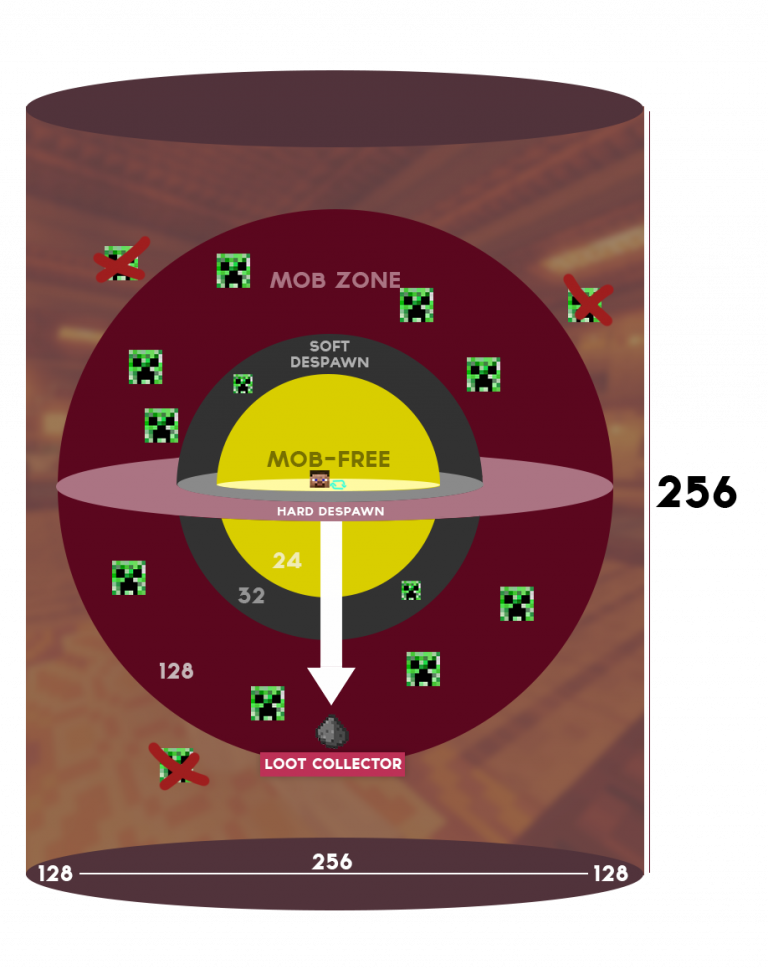
Graph explanation
- The brown cylinders indicate the mob spawn range.
- The red sphere indicates the mob spawning zone (in-between 24-128 blocks).
- The yellow sphere indicates the mob free zone as no mob will spawn that close to a player (24 blocks).
- Any entity that falls under the 32 block ring (entity activation range) will be ticked at normal rate.
- Any entity that resides in-between the 32-128 block ring will be ticked at a reduced rate.
- Any entity that falls outside the 128th block is instantly despawned.
Any alteration to the settings below requires you to adjust the farm’s overall size and its designated afk spot accordingly.
Vanilla / Paper default value
View Distance: 10 (chunks)
Simulation Distance: 10 (chunks)
Mob Spawn Range: 8 (chunks)
Despawn range (soft): 32 (blocks)
Despawn Range (hard): 128 (blocks)
entity activation range: 32 (blocks)
The 5 abovementioned config options are closely related to each other and it is crucial to ensure each value is set up correctly.
simulation distance determines the maximum possible size of a farm as area outside of this range will not be ticked.
- A farm cannot excess the radius of
(simulation distance -1)x16blocks. - Everything outside of
simulation distancewon’t tick so any farm bigger than this value wont be functional.
mob spawn range determines the maximum size of a farm as no mobs will spawn outside of this defined range.
Mob Spawn Rangeshould be between(simulation distance -1)to3minimum.- If you are running the vanilla default simulation distance of 10, you can keep the mob spawn range at 8 or lower.
- Mobs can only spawn a minimum of
24 blocksaway from players so setting mob spawn range below3is strongly discouraged unless your simulation distance is extremely low at 3 or lower. - Every mob farm has a designated mob collection platform, the size of the platform is determined solely by this value (in chunks).
Despawn range, both hard and soft, governs the despawn behavior of any non-persistent entities in Minecraft. Any entity within the soft despawn range has a predetermined chance to despawn, which helps rotate the variety of entities around a player. However, any non-persistent entities will instantly despawn if they are outside the hard despawn range.
Paper offers server owners the option to adjust the despawn range both horizontally and vertically, which can be very helpful for servers that need to run with a simulation distance lower than 10. This will be explained in greater detail in the later despawn range section.
When troubleshooting why a farm is not working, be sure to go through every config mentioned above and make the necessary modifications to the farm design accordingly. Do not copy and paste from YouTube tutorials block by block without taking these configs into account.
- Utilize
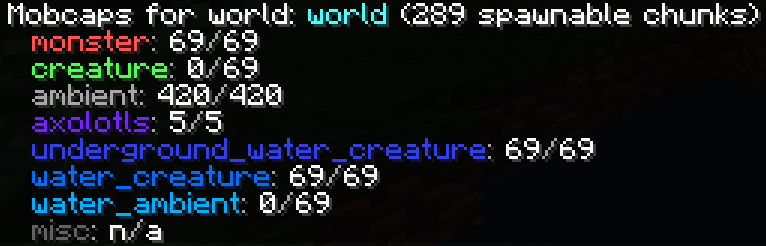
/paper mobcapsand/paper playermobcapsfor additional details on mob spawning around a player. It is especially useful for finding errors on the spawnproofing.
The video below provides a detailed explanation of mob spawning, presented by Nico is LOST. It is strongly recommended to watch.
Using Science to MAXIMIZE the Mob Spawning AlgorithmWhy is my farm built in older version slower now when nothing has changed? 🔗
Minecraft runs the spawn check between the lowest block and the highest block (ranging from Y0 to Y265 in 1.17) to check and see if the block is eligible for a spawn attempt, it then has a 24% change to successed at spawning at that particular Y position. Farms are designed based on this rule and their ideal location is chosen accordingly.
Large perimeter – Making a large perimeter around your farm eliminates all other possible spawn locations but the designated spot on the farm platform. (This can be seen on the SciCraft server and in most farm tutorials that use void flat-world for demonstration)
Enderman farm at Y0 – Enderman farms are advised to be built at Y0 as it is the most effective location.
Nether Farm above Netherroof – Nether farm are usually built high above Netherroof as it is generally a pain to make a large perimeter due to the amount of lava present, and by going higher into the Netherroof, you move your despawn sphere high up in the sky to eliminate all possibilities of a mob spawning anywhere outside of your farm platform.
With that being said, your farm may be less effective now due to the world height change. Instead of checking for an eligible spawn attempt from Y0 to Y265, it’s now checking from Y-64 to Y320 to find the lowest & highest block to run spawn attempts. Your farm from 1.17 located on Y0 now has 64 more additional blocks below it, which slows down the mob spawning.
How to mitigate the issues…
Rebuild your farm at the lowest point of the world which is now Y-64. (This is the most ideal solution but also the most painful).
Dig out an even larger perimeter & empty out everything below the farm from Y-64 to Y0 (air block only).
Mob spawn attempts are made on all loaded chunks with defined spawn-limits in bukkit.yml (or paper-world-defaults).
Accept & understand that mob spawning is inherently flawed in multiplayer servers and a more detailed explanation is provided in the per-player-mob-spawns section later.
TL;DR The most effective farm location is at the lowest possible Y level with only air block above. Due to the world height change your farm is no longer at the most ideal location.
server.properties 🔗
Essential configurations for server.properties
server.properties/view-distance 🔗
view-distance=10This sets the view distance (terrain only) of the server unless stated otherwise in spigot.yml.
simulation-distance=10This sets the simulation distance (ticking) of the server unless stated otherwise in spigot.yml.
Picking a suitable combination of view-distance & simulation-distance is extremely important.
If you decide to lower your view-distance & simulation-distance,…
Please refer to How Mob Spawn Works to ensure all other configs are adjusted accordingly.
simulation-distanceshould always be equal to or lower than view-distance. (If simulation distance is set higher than view distance, only an area up to view distance will be applied)- It is strongly discouraged to reduce these value lower than
5.
If you wish to provide further terrain view to players, please note that each additional increase after 10, the total amount of loaded chunks around a player will increase exponentially.
The formula to calculate the total chunks loaded by a single player is [(View Distance +2)x2+1]^2
For view-distance=10 (Vanilla default), a singular player will load 625 chunks.
For view-distance=5, a singular player will load 225 chunks.
For view-distance=15, a singular player will load 1225 chunks.
Although view-distance uses significant less resources compare to simulation-distance, please still be mindful on its performance impact especially on large server where every bit of resource saving helps.
Additionally, you are given the ability to overwrite/specify view distance & simulation distance for each world in spigot.yml. We will go over this in the per-world section later.
For example, you can opt for a higher view-distance in the_end dimension, which would make navigating through the void with Elytra a much more pleasant experience for your players.
Encourage your players to install Fabric mod loaders with client mods such as Bobby to cache chunk views locally with no cost to server performance!
server.properties/allow-flight 🔗
allow-flight=trueThis prevents players from getting kicked by the server for “flying” while riding a horse or climbing on scaffolding.
Having this option as true doesn’t mean everyone can fly, it just means that players would not get kicked if the server thinks they are flying.
server.properties/log-ips 🔗
log-ips=trueVanilla Minecraft provides an option to toggle player IP address logging.
For those who wants to protect player privacy, you can toggle this option to false.
This is especially useful in times where log files need to be shared with a third party auditor, maintainer, or developer for general troubleshooting.
server.properties/pause-when-empty-seconds 🔗
pause-when-empty-seconds=-1Mojang has introduced a new pause feature that puts the server into a sort of sleep mode when no players are online. This is very likely to cause issues with servers that have plugins. The option is set to -1 by default, which means it is disabled.
bukkit.yml 🔗
Essential configurations for bukkit.yml
bukkit.yml/spawn-limits 🔗
spawn-limits:
  monsters: 70
  animals: 10
  water-animals: 5
  water-ambient: 20
  water-underground-creature: 5
  axolotls: 5
  ambient: 15
This section determines the mob cap in your server. Lowering the value here has the most direct impact on server performance, as entities are one of the most resource intensive tasks the server has to tackle.
The global entity cap will scale based on online player counts as long as per-player-mob-spawns is set to true in paper-world-defaults.yml. Given that valid spawn locations exist around a player; the server will attempt to spawn entities until the spawn-limit cap is reached.
The spawn limit can also be set on a per-world basis. Please check out the Per World config section here for additional information.
Maintaining Perceived Mob Density 🔗
To help maintain the Perceived mob density consistent with Vanilla default, please also alter the mob-spawn-range in spigot.yml accordingly to achieve this illusion.
To achieve this, a simplified calculation is done here.
For example, if I want to set my monster cap to 45 and also keep the mob density roughly the same as before, I would solve the math equation below:

(Default Mob Cap) : (Default Spawn Area) = (New Mob Cap) : (New Spawn Area)

where the constants are as followed,

Default Mob Spawn Range = 8 chunks
Minimum distance where a mob can spawn = 24 blocks away from a player
Default Spawn Area = [ (Mob Spawn Range x2 x16) +1]^2 - ( 24 x2 +1 )^2 = (8x2x16+1)^2 - 49^2 = 66049 - 2401 = 63648

70:63648 = 45:b ; where b = New Spawn Area (in blocks)
63648 x 45 = 70b
b = 40916

Let a = New Mob Spawn Range, where b = [ (a x16 x2) +1]^2 - (24 x2 +1)^2, and b = 40916
(32a +1)^2 - 2401 = 40916
(32a +1)^2 = 43317
32a +1 = 208
32a = 207
a = 6.46

I will then set mob-spawn-range to 6 (or 7) in spigot.yml
Here is a cheat sheet with prefilled suggestions for monster category for those who are too lazy to work out the math, please read carefully and apply the config accordingly.
| Overall Entity Count (%) | Suggested spawn-limit in bukkit.yml | Suggested mob-spawn-range in spigot.yml | Actual Calculated Number |
|---|---|---|---|
| 100% (Vanilla) | 70 (default) | 8 (default) | 8 (default) |
| 90% | 63 | 7 or 8 | 7.6 |
| 80% | 56 | 7 | 7.18 |
| 70% | 49 | 6 or 7 | 6.74 |
| 60% | 42 | 6 | 6.26 |
| 50% | 35 | 5 or 6 | 5.75 |
| 40% | 28 | 5 | 5.18 |
| 30% | 21 | 4 or 5 | 4.55 |
| 20% | 14 | 4 | 3.81 |
| 10% | 7 | 3 | 2.89 |
| 3% | 2 | Please upgrade your server hardware | My Samsung smart fridge can handle more entities |
The suggested numbers above are for the purpose of keeping the mob density consistent with Vanilla. Feel free to make up your own numbers that work for your server. As for other categories, there will never be an ideal number, as entities like sheep, cows, and fish have more complicated spawning rules and additional mechanics. Generate a spark report, analyze it, and make proper adjustments as needed.
Please read the Understand Mobspawn section to validate other configs as needed if you do make changes here.
💡 Reducing mob caps by up to 50% of the Vanilla value is unlikely to be noticeable in most cases. If you have trouble deciding on a value, start with 35, then fine-tune it later.
Entity related performance issue?
Generate a spark report during the busiest period where the most players are online in your server and analyze the report for problematic areas to be addressed.
- Overall, entities should be less than
30%of your tick and if you are seeing high tick time spent on mob spawning, it means that your entity cap is too high, reduce accordingly. - Ideally, you want to get your mob density as close to Vanilla as possible. A slight go over 50 mspt during peak hours is acceptable, but continue to lower the value if you are consistently exceeding it with the preset value above.
- As long as mobs are instantly killed in a farm, the yield of the farm should be roughly the same as Vanilla Minecraft given the farm design is adjusted accordingly.
- Please note that the limits here only apply to naturally spawned entities. Entities being created through special spawning mechanisms such as Allay Duplication, Iron Golem from Villager Gossiping, Guardian within Ocean Monuments are not limited by this config. A plugin is required to properly limit them. See Quality of Life and Must-have Plugins section below for more info.
Every entity in the game falls under 1 of the 7 categories as listed below 🔗
-
monstercategory consists of Warden, Evoker, Wither, Hoglin, Cave Spider, Camel, Husk, Zoglin, Slime, Bogged, Zombified Piglin, Pillager, Wither Skeleton, Zombie, Nautilus, Stray, Blaze, Witch, Piglin Brute, Spider, Drowned, Phantom, Illusioner, Ravager, Vindicator, Creeper, Parched, Elder Guardian, Giant, Breeze, Zombie Horse, Zombie Villager, Endermite, Silverfish, Shulker, Ghast, Vex, Piglin, Guardian, Enderman, Magma Cube, Ender Dragon, Skeleton, Creaking. -
animalsorcreaturecategory consists of Wolf, Bee, Horse, Chicken, Frog, Allay, Pig, Skeleton Horse, Llama, Polar Bear, Mule, Armadillo, Donkey, Parrot, Rabbit, Fox, Happy Ghast, Goat, Mooshroom, Cow, Strider, Cat, Sniffer, Ocelot, Trader Llama, Tadpole, Wandering Trader, Panda, Turtle, Camel, Sheep -
ambientcategory consists of bat. Bat is useless. -
water-animalsorwater_creaturecategory consists of Nautilus, Dolphin, and Squid. -
water-ambientcategory consists of cod, pufferfish, salmon, tropical fish. -
water-underground-creatureorunderground_water_creaturecategory consists of Glow Squid. -
axolotlcategory consists of Axolotl. -
Misccategory consists of Bamboo Raft with Chest, Cherry Boat with Chest, Eye of Ender, Marker, Jungle Boat with Chest, Interaction, Spectral Arrow, Wind Charge, Item Display, Mangrove Boat with Chest, Minecart with Chest, Snowball, Item Frame, Mannequin, Firework Rocket, Evoker Fangs, Area Effect Cloud, Minecart with Command Block, Dark Oak Boat, Oak Boat, Lingering Potion, Shulker Bullet, Acacia Boat with Chest, Spruce Boat, Acacia Boat, Birch Boat with Chest, Glow Item Frame, Spruce Boat with Chest, Bamboo Raft, Jungle Boat, Player, Thrown Bottle o’ Enchanting, Leash Knot, Cherry Boat, Primed TNT, Wither Skull, Villager, Text Display, Minecart with Furnace, Item, Ominous Item Spawner, Trident, Mangrove Boat, Thrown Ender Pearl, Snow Golem, Arrow, Pale Oak Boat with Chest, Experience Orb, Splash Potion, Minecart, Painting, Block Display, Copper Golem, Iron Golem, Falling Block, Armor Stand, Pale Oak Boat, Dragon Fireball, Minecart with TNT, Dark Oak Boat with Chest, Oak Boat with Chest, Llama Spit, Thrown Egg, Small Fireball, Fishing Bobber, End Crystal, Birch Boat, Fireball, Minecart with Monster Spawner, Lightning Bolt, Minecart with Hopper.
Some categories have two different names listed due to Paper using the proper names in related paper configs while bukkit.yml still uses the old names.
💡 Each entity will show up individually on the spark report, you can make necessary adjustments accordingly based on their categories.
💡 Bat is the only entity in ambient and it has no gameplay functionality so it is safe to set ambient to zero for a no compromise performance saving there.
Villagers are complex entities and very resource intensive 🔗
Villagers are generated with Village structures and bred by players. They are the entities that cause a great deal of performance issues in most Minecraft servers. Since they are not limited by the config options in bukkit.yml mentioned above, using the recommended methods below to artificially control their populations and their impact on the server is strongly recommended. It is an alteration to Vanilla gameplay but it is sadly necessary as most players are not resource efficient and would produce tons of Villagers unnecessarily.
Below are a few different approaches to help address villager problems, please consider them carefully and pick the one that works best for your community.
- Install VillagerLobotomizer Plugin to dynamically remove the A.I. from the villagers if they are used as trading hall vendors.
- This is a very good middle ground for those who want functionality while reducing the performance burden.
- Please consider setting
prevent-trading-with-unlobotomized-villagerstotrueto maximize the effectiveness of this plugin. Doing so ensures that free roaming villagers are no longer a performance burden on your server by requiring players to build proper trading halls, or even just a temporary enclosure, before trading becomes possible. Be sure to communicate this change to your player base.
- Attempt to reduce villager tick-rates to ease the workload on the server.
- Introduce a hard cap with a farm limiter type plugin and then clearly communicate the limit to your players so they can adjust their playstyle.
- Introduce different ways for players to gain loot thus greatly reducing the need for player-made trading halls. This may include a community trading hall, a global admin shop with villager loot, or customize your wandering traders loot table with superior items.
💡 The most effective way to optimize villagers is to reduce their number or provide alternative methods for obtaining resources normally supplied by villager trading halls.
bukkit.yml/ticks-per 🔗
ticks-per:
  animal-spawns: 400
  monster-spawns: 1
  water-spawns: 1
  water-ambient-spawns: 1
  water-underground-creature-spawns: 1
  axolotl-spawns: 1
  ambient-spawns: 1
  autosave: 6000
This section determines the frequency of each category of entities making an attempt to spawn (value in ticks).
Minecraft will always attempt to spawn entities until it hits the spawn-limits on previous section. Altering the number here should be your secondary choice due to the fact that the mob cap will almost always be reached. All you are doing is just delaying the impending doom, please establish a proper entity cap on the spawn-limits mentioned previously first.
Not Meeting Mobcaps
Calculating and validating mob spawn costs resources, so it is always better to first reduce the overall entity cap in the spawn-limits section and then adjust the ticks-per setting as a secondary buffer.
Use /paper mobcaps and /paper playermobcaps to monitor and ensure the mob cap is consistently being reached. If your mob cap cannot be reached in a timely manner, it is likely that your spawn-limits are set too high. Using a spark report with the EntityDetection plugin, you should be able to observe and identify why the mob cap isn’t being reached.
net.minecraft.server.level.ServerChunkCache.tick() 69.03%
  net.minecraft.server.level.ServerChunkCache.tickChunks() 42.04%
    net.minecraft.server.world.level.NaturalSpawner.spawnForChunk() 37.08%

(How failing to meet the mobcap might appear in a Spark report.)
If you notice an unusually high number of ticks spent on mob spawning in your Spark report, your spawn-limits may be too high. Reduce the mob cap in the section above to allow the mob cap to be reached more efficiently.
For Skyblock/Oneblock gamemodes, this adjustment is especially crucial because the limited spawnable area often makes it difficult for the server to reach the mob cap. This can cause the server to repeatedly attempt to spawn mobs. Adjust the configurations accordingly to address this issue.
This option directly reduces the yield rate of all mob farms, so selecting an optimal value is essential. Striking the right balance is key to optimizing performance while maintaining a decent gameplay experience.
💡 Optionally adjust the tick rate on a per-world basis to address issues specific to particular worlds, utilizing Paper’s per-world configs.
paper-world-defaults.yml/entities.spawning.ticks-per-spawn 🔗
entities:
  spawning:
    ticks-per-spawn:
      ambient: -1
      axolotls: -1
      creature: -1
      monster: -1
      underground_water_creature: -1
      water_ambient: -1
      water_creature: -1
The above settings can be individually defined in world/dimensions/minecraft/[your-world-name]/paper-world.yml to serve as overrides to the default configuration. This enables server owners to fine-tune the intervals between each spawn attempt on a per world basis.
spigot.yml 🔗
Essential configurations for spigot.yml
spigot.yml/world-settings.default.view-distance 🔗
view-distance: default
simulation-distance: default
This serves as an overwrite to the identical config in the server.properties
Putting a value here will overwrite the value inside server.properties
The value default instructs the server to use the value from server.properties
The value can be set per-world if an additional category is created.
spigot.yml/world-settings.default.mob-spawn-range 🔗
mob-spawn-range: 8Radius in chunks around a player in which server attempts to spawn mobs.
As mentioned previously in the bukkit.yml section, this value can be altered to adjust the perceived mob density.
mob-spawn-range should always be set to a maximum of (Simulation Distance - 1) with a minimum of 3, as any entity falling outside of the simulation distance and the bordering chunk won’t be ticked.
Note: This does not apply if you are running Vanilla default shown in the table below.
| Simulation Distance | mob-spawn-range |
|---|---|
| 10 (Vanilla) | 8 |
| 9 | 8 |
| 8 | 7 |
| 7 | 6 |
| 6 | 5 |
If your mob-spawn-range is higher than the simulation-distance for example, the perceived mob density would be lower due to the fact that monsters would attempt to spawn outside of your simulation-distance. It is crucial to have the correct value.
For example, if you have a simulation-distance of 6, your mob spawn range can be set between 3~5.
Technically, 3 is not the minimum value, but due to the fact that no mobs will spawn within 24 blocks around the player, it makes zero sense to go below 3 as it drastically reduce the spawnable area and mob cap may not be reached in extreme case.
Refer back to Understand Mobspawn section for full detail.
spigot.yml/world-settings.default.nerf-spawner-mobs 🔗
nerf-spawner-mobs: falseThis setting removes AI from mobs spawned from a spawner.
If your server allows players to relocate spawners, setting this option to true can reduce lag.
Please also toggle spawner-nerfed-mobs-should-jump to true in paper-world-defaults.yml if you do decide to enable this. It will allow mob to jump so certain farms will remind functional.
Read the Things to Avoid section for why allowing your players to silk touch a spawner is a bad idea.
spigot.yml/world-settings.default.entity-tracking-range 🔗
This determines how far away in blocks that an entity is tracked and sent to the client in order for players to see them.
Paper provides these options for you to decide how far away an entity should be tracked (display to client) instead of tracking everything up to bordering chunks (simulation-distance -1). This is an optimized solution to combat expensive entity tickings.
You can find related performance merits in your spark report listed under Chunk provider tick.
tracker stage 1 is tracking entities.
tracker stage 2 is broadcast entity tracking changes.
If Chunk provider tick is taking a significant amount of resource, you should first try to reduce overall entity counts, then lower simulation distance; and if all else failed, reduce tracking range as a last resort.
For a server with sufficient hardware to support it, it may be beneficial to increase entity-tracking-range to boost gameplay experience. The value is in blocks and if you do decide to increase it, please keep it at a maximum of equal to or below (simulation distance -1) x16.
💡 The majority of servers are small and are limited to friends only. These values can be safely increased to enhance the gameplay experience, with an implied performance tradeoff.
Additionally, Paper allows the server owners to define the vertical Y value of entity-tracking-range in paper-world-defaults.yml/entities.tracking-range-y if one wish to have entities to show up or disappear faster.
entity-tracking-range categories
player consists of players.
monster consists of monster, raider, and flying monster.
animal consists of villager, water-animal, and animal.
misc consists of itemframe, painting, sign, dropped item, experience orb.
display consist of display entity.
other consists of everything not listed above (I.E. armor stand).
The value is in blocks and should always be set to a maximum of (simulation-distance -1)x16 and no lower than 1.
If you are experiencing invisible Ghast Ambush, it may be a symptom of your entity-tracking-range for monster is set too low.
- Additionally, check client side setting
Options>Video Settings>Entity Distanceand make sure it is set high enough to show the Ghast.
💡 If you make changes to the entity-tracking-range, please also adjust and match the value in the corresponding category on entity-activation-range as well, so players do not see frozen entities.
spigot.yml/world-settings.default.entity-activation-range 🔗
entity-activation-range:
  animals: 96
  monsters: 96
  raiders: 96
  misc: 16
  water: 16
  villagers: 32
  flying-monsters: 32
  wake-up-inactive:
    animals-max-per-tick: 4
    animals-every: 1200
    animals-for: 100
    monsters-max-per-tick: 8
    monsters-every: 400
    monsters-for: 100
    villagers-max-per-tick: 4
    villagers-every: 600
    villagers-for: 100
    flying-monsters-max-per-tick: 8
    flying-monsters-every: 200
    flying-monsters-for: 100
  villagers-work-immunity-after: 100
  villagers-work-immunity-for: 20
  villagers-active-for-panic: true
  tick-inactive-villagers: true
  ignore-spectators: false
entity-activation-range determines how far away (in blocks) an entity should be activated. Any entity falling outside of this zone will be ticked at a reduced frequency.
These values should never exceed (simulation-distance - 1) x16.
Vanilla Parity and Offering a Better Gameplay Experience
Please note that the suggested value above is higher than the default setting provided by Paper with a default simulation distance of 10. While it may seem counterintuitive to use a larger value, it is crucial to understand that we are optimizing for a better gameplay experience. Therefore, Vanilla parity should take precedence over potential performance gains.
If you are considering disabling the EAR (Entity Activation Range) feature entirely, you can set their values to 0. This will disable them. For the majority of small to mid-sized servers, this should be acceptable.
Reducing entity activation range should be the last resort…
💡 Keeping the overall entity count under control is a more effective way to avoid performance issues than running a large number of entities with partially broken Vanilla mechanics.
Additionally,…
tick-inactive-villager could be changed to false if you do not wish to tick all villagers that are loaded but outside of activation range. In other words, only villagers that are within the activation range will be active.
- However, doing so may reduce the yield of Iron Golem farms if a player is not in close proximity.
- The villager trade cooldown timer will not go down if no player is close by.
spigot.yml/world-settings.default.entity-activation-range.wake-up-inactive 🔗
work immunity and wake up inactive are implemented by Paper with the goal of bringing more liveness to the world by allowing certain entities to “wake up” and do some work for a set amount of time. It allows villager to restock, find work etc…
Change max-per-tick to 0 if you do not want this behavior for that particular category.
Click here to read EAR Commit message on Github
To elaborate a bit more, we will use this snippet of wake-up-inactive below as an example to help you get a better understanding of this mechanic.
wake-up-inactive:
  villagers-max-per-tick: 4
  villagers-every: 600
  villagers-for: 100
villagers-work-immunity-after: 120
villagers-work-immunity-for: 20
The above setting translates into the following behavior…
For every 600 game ticks, there is a chance of up to 4 randomly selected loaded villagers, that has not been active for 120 ticks, to wake up for 100 ticks where they are able to wake up and do stuff for 20 ticks while being immune from the freezing effect of being too far away from players.
To disable work immunity, set villagers-work-immunity-after to 0, please note that this will break villager behavior unless EAR is disabled altogether.
spigot.yml/world-settings.default.merge-radius 🔗
merge-radius:
  item: -1
  exp: -1
Paper by default follows the same merge mechanism as Vanilla Minecraft.
As of Paper 1.21 build #38, the merge behavior has been restored to matching Vanilla Minecraft (-1 means default). To fully understand how exp merge works, check out this video by Nico is LOST It has an in-depth explanation of the Vanilla merge mechanic.
If you do decide to use the Craftbukkit/Spigot merge feature, the value is in blocks, adjust accordingly to your needs. Additionally, you can manually define a value in config/paper-world-defaults.yml/entities.behavior.experience-merge-max-value if you wish to still merge the exp orb but with a set amount of maximum value per orb.
💡 It is beneficial to keep the Vanilla mechanic intact, as changing the value here will result in the breakage of farms that rely on XP flows or item merging in particular ways.
Additional & Optional optimizations
config/paper-global.yml

misc:
  xp-orb-groups-per-area: default
This option allows you to set a value higher than the default (40) to more aggressively merge experience orbs, reducing the potential performance impact of very large and fast experience farms at the cost of some behavior changes.
config/paper-world-defaults.yml

entities:
  behavior:
    only-merge-items-horizontally: true
Additionally, only-merge-items-horizontally can also be toggled to true in config/paper-world-defaults.yml to further align the experience orb behavior more closely with Vanilla. It has a slight performance hit but is very beneficial to the player’s gameplay experience.
paper-configs 🔗
A config folder in your Minecraft root folder stores the default and global config files for your Paper server.
/config/paper-global.yml consists of all available global config.
/config/paper-world-defaults.yml consists of the default config for all worlds.
/world/dimensions/minecraft/[your-world-name]/paper-world.yml consists of per-world config for that particular world.
Additionally, a per-world basis config file called paper-world.yml is also generated in each world folder.
paper-world.yml can be edited to overwrite the config on a per-world basis and is located in /world/dimensions/minecraft/[your-world-name]/paper-world.yml
paper-world-defaults.yml 🔗
Essential configurations for paper-world-defaults.yml
paper-world-defaults.yml/entities.tracking-range-y 🔗
tracking-range-y:
  enabled: true
  animal: default
  display: default
  misc: default
  monster: default
  other: default
  player: default
Paper provides the ability to config the vertical Y level tracking distances
This is especially useful for servers that wish to make entities appear or disappear earlier or later based on Y level depth.
It can be enabled for particular categories per world based on server needs.
paper-world-defaults.yml/entities.spawning.despawn-ranges 🔗
despawn-ranges:
  ambient:
    hard: default
    soft: default
  axolotls:
    hard: default
    soft: default
  creature:
    hard: default
    soft: default
  misc:
    hard: default
    soft: default
  monster:
    hard:
      horizontal: default
      vertical: default
    soft: default
  underground_water_creature:
    hard: default
    soft: default
  water_ambient:
    hard: default
    soft: default
  water_creature:
    hard: default
    soft: default
This value defines how far away a mob should have a chance to despawn (soft) or instantly despawn (hard).
Paper also offers the ability to separately define the despawn range both vertically and horizontally. This is extremely helpful for servers that need to run with a simulation distance lower than the default (10), either due to weaker hardware or higher player counts.
💡 The default means it follows Vanilla Minecraft, where the soft despawn range is 32 and the hard despawn range is 128.
Rules to follow:
If simulation-distance is below 10, mob-spawn-range should be set to either equal to or less than 8, or to (simulation-distance -1), whichever value is lower. While despawn-ranges.hard.horizontal should be set to (simulation-distance -1) x16.
This ensures that all entities have a chance to despawn before hitting the bordering chunk, thus preserving natural mob density and preventing unnecessary mob spawning or despawning attempts.
To individually define the horizontal and vertical despawn ranges, two additional lines should be added under the monster.hard section, as shown in the snippet below.
despawn-ranges:
  monster:
    hard:
      horizontal: default
      vertical: default
    soft: default
The vertical value should always be kept at the default, which is 128 in Vanilla Minecraft. This is very important to preserve gameplay consistency, as the majority of YouTube farm tutorials instruct players to build their AFK spots accordingly.
If you need to run the simulation distance lower than 10, consult the table below for a better visualization of the suggested values.
| simulation-distance | mob-spawn-range | despawn-range.hard.horizontal |
|---|---|---|
| 10 (Vanilla) | 8 (Vanilla) | 128 (Vanilla) |
| 9 | 8 | 128 |
| 8 | 7 | 112 |
| 7 | 6 | 96 |
| 6 | 5 | 80 |
| 5 | 4 | 64 |
| 4 | 3 | 48 |
| 3 (not ideal) | 3 | 36 (not recommended) |
No mobs will naturally spawn within 24 blocks or less around a player so it is not recommended to change hard.horizontal value to lower than 36.
Please note that farm size is still directly limited by your simulation distance horizontally. Having the vertical despawn range set to default (128) simply means that players can still build their AFK spot matching Vanilla Minecraft.
paper-world-defaults/entities.spawning.despawn-time 🔗
Paper provides the ability to set despawn times individually for each entity type, in addition to the existing Vanilla despawn rules.
A complete list of entity type can be found on Minecraft unofficial wiki.
despawn-time:
  llama_spit: 1200
  snowball: 1200
  fireball: 1200
  dragon_fireball: 1200
  small_fireball: 1200
  arrow: 3000
  shulker_bullet: 3000
  wither_skull: 3000
  trident: 3000
Using despawn-time together with entity-per-chunk-save-limit and alt-item-despawn-rate in the following sections helps prevent player- or game-generated entities that can sometimes cause performance issues or server crashes.
paper-world-defaults.yml/chunks.entity-per-chunk-save-limit 🔗
entity-per-chunk-save-limit:
  experience_orb: 50
  snowball: 20
  ender_pearl: 20
  arrow: 20
  fireball: 10
  small_fireball: 10
  dragon_fireball: 5
  egg: 20
  area_effect_cloud: 10
  llama_spit: 5
  shulker_bullet: 8
  splash_potion: 10
  spectral_arrow: 5
  experience_bottle: 5
  trident: 10
  wither_skull: 10
This option limits the maximum amount of each specified entity saved in a chunk.
The limit here is essential as it prevents the server from stalling when attempting to load a chunk that contains a large number of these projectile entities.
Sometimes projectiles are fired into unloaded chunks intentionally by players to crash a server, or unintentionally by sheer luck. Both of which can be avoided with these limits in place.
paper-world-defaults.yml/entities.spawning.alt-item-despawn-rate 🔗
alt-item-despawn-rate:
  enabled: true
  items:
    cobblestone: 600
    cobbled_deepslate: 600
    netherrack: 600
    rotten_flesh: 900
    ender_pearl: 900
    leather: 900
    bone: 1200
    bone_meal: 1200
    cactus: 900
    egg: 900
    feather: 900
    gunpowder: 1200
    arrow: 900
    blaze_rod: 1200
    cod: 1200
    salmon: 1200
    string: 1200
    ink_sac: 900
    slime_ball: 1200
    phantom_membrane: 900
Enabling this option will allow you to despawn commonly dropped items/junk items faster
cactus is added on the list in an effort to reduce the impact of the common cactus farm in which many cactus would be left on the surface until they despawn due to the farm design.
egg is also listed here in an effort to prevent zombie from picking them up thus preventing them from desapwning. It is a common issue in survival servers where players may be afk for an extensive period of time and results in groups of zombie all holding commonly dropped items around the player bases.
The value is in ticks which means a value of 20 equals to 1 second of server time. Additional items can be added to the list above and you should find your own reasonable value that suits your needs as every server has their own unique circumstances. For example, if a farm utilizes minecarts in a closed loop to pick up drops, you want to ensure the value isn’t set too low, so the minecart is able to pickup items before they despawn.
A complete list of item type can be found here..
Additionally, there is a similar config item-despawn-rate that controls all dropped-item despawn timer in spigot.yml; however, that is a very intrusive change that breaks the 5 minute de-spawn time promise that most Minecraft players are familiar with, hence why it is omitted here.
The goal of optimizing the server is to make the game more enjoyable for your players not to make them suffer!
paper-world-defaults.yml/collisions.max-entity-collisions 🔗
collisions:
  max-entity-collisions: 8
This value is the maximum amount of entities that should be included in collision lookups.
The server will stop processing any additional entity collisions after this threshold.
Lowering this value will help with performance as the animal AI goes haywire trying to pathfind away from each other in a small confined space.
Do not set the value lower than 3 as it will have game-breaking effects on things that rely on collisions in order to work properly.
This is not to be confused with gamerule maxEntityCramming.
- The cramming gamerule sets the maximum amount of entities that can be crammed together before they start taking suffocation damage.
- To lower this value, use
/gamerule maxEntityCramming [number](default is 24). - This gamerule has a direct impact on one block animal farms as the maximum number of animals that can be held inside a block space is determined by this value.
paper-world-defaults.yml/collisions.fix-climbing-bypassing-cramming-rule 🔗
collisions:
  fix-climbing-bypassing-cramming-rule: true
This fix the issue where climbing mobs bypass the cramming rules.
Leave it false if you have farms that utilize this behavior (very unlikely).
paper-world-defaults.yml/entities.spawning.per-player-mob-spawns 🔗
per-player-mob-spawns: truePaper will attempt to spawn mobs more evenly across all players online.
Ensure this option is set to true. This is beneficial to the majority of servers.
When enabled, the global mob cap will scale based on the number of players online. To access a detailed breakdown of mobcaps, use the following commands…
/paper mobcaps         for global mobcaps and total spawnable chunks.
/paper playermobcaps   for individual player mobcaps.
💡 These two commands are especially useful for troubleshooting mob farms. Run the command while standing on the AFK spot of a farm, and if no mobs are spawning inside the farm while the mobcap is already full, it means that you have failed to spawn-proof it.
Spawnable chunks are based on the number of loaded chunks and the spawn-limits as defined in bukkit.yml (or paper-world-defaults.yml). Please make adjustments when necessary, especially if you do not have it enabled prior.
Vanilla mob spawning is not only complicated, but also inherently flawed on multiplayer servers. For example, we have two players in the Nether dimension. Player A is AFKing high up on a Nether ceiling Piglin farm while Player B is just chilling on the Nether Waste biome. Even though the spawn attempts are made on all loaded chunks around both players, a vast majority of the successful mob spawn attempts will end up around the player with the most favorable spawning conditions. In this case, Player B will be getting most of the mobs while Player A gets very few, simply because there are more spawnable chunks around Player B overall.
paper-world-defaults.yml/chunks.prevent-moving-into-unloaded-chunks 🔗
prevent-moving-into-unloaded-chunks: trueThis prevents players from moving into an unloaded chunk which would otherwise cause a sync chunk load.
When a player moves into an unloaded chunk, the server will make the task of loading the chunk with the highest priority, thus tanking the TPS.
paper-world-defaults.yml/misc.redstone-implementation 🔗
redstone-implementation: ALTERNATE_CURRENTPaper provides options to specify the redstone implementation the server uses.
The available options are VANILLA, EIGENCRAFT, and ALTERNATE_CURRENT with VANILLA being the default.
ALTERNATE_CURRENT implementation is more efficient and recommended, but comes with possible behavioral changes. Please use with caution!
For technical details on ALTERNATE_CURRENT, read more here.
paper-world-defaults.yml/environment.treasure-maps 🔗
treasure-maps:
  enabled: true
  find-already-discovered:
    loot-tables: default
    villager-trade: true
There are several methods to further mitigate the performance issue around treasure maps as listed below.
Method 1 - OkTreasures - A plugin solution brought to you by Kyle OkTreasures fixes map related crashes by replacing the Vanilla buried treasure search with a custom, faster, and simpler one: it randomly selects a beach within a reasonable distance and places the treasure there. Since this process is mostly asynchronous, it won’t cause lag.
Method 2 - TreasureMapsPlus - A plugin solution brought to you by Machine Maker TreasureMapsPlus is made by Machine Maker, an avid member of the PaperMC project, who aims to solve the issue surrounding treasure maps with a slight behavior change. Instead of leading players to an undiscovered treasure, the plugin simply rewards the player with the loot from the chest loot table upon using the map.
Method 3 - Limit the search radius
By toggling the villager-trade option under find-already-discovered to true, it will reduce the performance impact of treasure maps. (The map will no longer try to find undiscovered treasure and will instead return the nearest one.)
Method 4 - Completely disable treasure maps
Alternatively, you could also opt to completely disable the functionality of treasure maps by setting enabled to false to prevent any issues related to the prolonged feature lookup.
Why are treasure maps resource intensive? Due to how Vanilla Minecraft generates and looks up new loot tables from treasure maps found via cartography villagers or dungeon loot chests, the server may stall due to the potentially large amount of lookups done when it attempts to locate a chest that has not yet been discovered by other players. The issue can be mitigated by using the options provided above, along with modifications to the Vanilla gameplay. However, it is sometimes necessary to prevent significant lag spikes or prolonged server stalls that could result in the server being shut down by the watchdog.
Do you know...

The treasure map searches up to a ~1100 block radius for buried treasures and remains blank if none is within the range.

That's a big radius!
/gamerule spawnChunkRadius (Removed)** 🔗
As of 1.21.9+, the concept of spawn chunks has been completely removed from the game. The old paper-world-defaults.yml/spawn.keep-spawn-loaded config and the later gamerule replacement have both been removed.
A close replacement is the /forceload command, or alternatively, a plugin can also force load chunks as the server owner desires.
paper-world-defaults.yml/chunks.max-auto-save-chunks-per-tick 🔗
chunks:
  auto-save-interval: default
  max-auto-save-chunks-per-tick: 24
By default, Paper saves chunks incrementally, up to 24 chunks per tick.
This configuration option is for advanced users only and is provided here for informational purposes. The majority of servers will be fine with the default value and no change is required. Please be extremely cautious if you decide to change the value here, as setting it incorrectly will likely result in a negative performance impact and an increased risk of data loss.
The basic formula is as follows:
(max-auto-save-chunks-per-tick) x (auto-save-interval) ≥ (total loaded chunks that requires save)If you suspect that chunk saving is causing performance issues, please join Paper Discord with a spark report before altering the configs here.
💡 There is no such thing as ‘the most ideal value’ for the configs here; most likely, the default will be the most optimal and no change is required.
paper-world-defaults.yml/chunks.delay-chunk-unloads-by 🔗
chunks:
  delay-chunk-unloads-by: 10s
Paper provides finer control over how often chunks are saved and how fast they are unloaded.
Lowering the delay-chunk-unloads-by value too low would actually result in additional work on the server to reload chunks that were just unloaded if a player happens to be hanging around an area.
The default value here is most likely going to be the most optimal option for the majority of server owners.
💡 Please note that Fishing Rod Stasis Chambers require the chunk to be unloaded instantly in order to function. If this chunk unloading functionality is essential to your server, you can set the value to 0.
paper-world-defaults.yml/tick-rates 🔗
tick-rates:
  behavior:
    villager:
      validatenearbypoi: -1
  container-update: 1
  dry-farmland: 1
  grass-spread: 1
  mob-spawner: 1
  sensor:
    villager:
      secondarypoisensor: 40
Paper provides finer control options governing certain ticking rates.
Increasing the value here will reduce resource usage with some cost to their respective behaviors.
dry-farmland, grass-spread, and mob-spawner can be adjusted to increase the interval between each check, thereby reducing their performance impact. The difference is mostly insignificant for the majority of small servers; however, it may be beneficial for servers with a large number of spawners and farmlands.
If your server is experiencing villager related performance issues, it is highly recommended to use a plugin solution such as VillagerLobotomizer before tweaking their sensor frequency, as this config is not an ideal solution to the root cause of the problem.
paper-world-defaults.yml/environment.optimize-explosions 🔗
environment:
  optimize-explosions: false
Setting this to true will reduce the impact of calculating a large number of explosions.
The actual real world scenario that would benefit from this is minimal; however, if your friends love to blow things up with an unholy amount of TNT, this setting may be right for you.
In case you do really love to blow things up and notice that your TNT detonation does not behave like Vanilla, increase the max-tnt-per-tick threshold located in spigot.yml to remedy the issue. Please note that the threshold is there to safeguard your server and increasing the value would also increase the risk of your server crashing in the event of a large amount of TNT detonation.
paper-world-defaults.yml/entities.armor-stands 🔗
armor-stands:
  do-collision-entity-lookups: true
  tick: true
This decides whether armor stands should be ticked and accounted for in collisions.
Setting these to false will…
- Remove any armor stand related lag machines.
- Break plugins that utilize armor stands.
- Break farms such as an automatic ice maker.
I recommend using an entity limiting plugin to address the extreme case of a player intentionally placing tens of thousands of armor stands, as making them non-functional is not an ideal solution to the problem.
paper-world-defaults.yml/lootables 🔗
lootables:
  auto-replenish: false
  max-refills: -1
  refresh-max: 2d
  refresh-min: 12h
  reset-seed-on-fill: true
  restrict-player-reloot: true
  restrict-player-reloot-time: disabled
Toggle auto-replenish to true if you plan on running a long-term survival server. It replenishes the chest once looted and would bring some life back to your old worlds.
max-refillsets the maximum refills, a value of-1will make it unlimited.refresh-min/maxdefines the amount of time that must pass before the chest is refilled. This does not require the chunk to be loaded.reset-seed-on-fillwill shuffle loot table seeds on each refill so the items inside the chest will always be different.restrict-player-relootwill stop the same player from camping and looting the chest multiple times.restrict-player-reloot-time(default disabled) can be enabled to stop the same player from looting the same chest again within a definable time period.
The units of measurement here are s for seconds, m for minutes, h for hours, d for days. m is NOT for months!!
Scenario 1: If a player loots a chest once and comes back later, there will not be new loot.
Scenario 2: If Player A loots a chest and then Player B comes by later, the chest will be refilled and lootable for Player A again.
Scenario 3: If restrict-player-reloot-time is set to 3d, a player cannot reloot the same chest until 3 days later.
Note: The chest will refill regardless of the remaining items inside unless it is full.
Scenario 4: If Player A opens the chest (generating the loot) and leaves the loot inside, Player B who comes by later will get a set of newly generated loot plus whatever was left by Player A previously.
Scenario 5: If Player A opens the chest and fills it up with diorite, Player B who comes by later will get nothing new (but diorite) because the chest is already full, thus no new loot will be generated.
💡 The lootables refill feature only works with the original world-generated chests. Please let your players know not to break them.
paper-world-defaults.yml/feature-seeds.generate-random-seeds-for-all 🔗
feature-seeds:
  generate-random-seeds-for-all: true
Toggling this option to true will provide you with some level of security against seed-cracking tools, as it randomizes the sub-seed for a Minecraft world rather than using the world seed to generate features.
This is a very useful feature if you aim to prevent unfair advantages that players may gain if they manage to figure out your world seed using tools like SeedcrackerX.
Please note that this config covers features only. For generated structures, please manually alter the structure seeds in spigot.yml.
(This behavior was inherited from Spigot, which does not automatically randomize the structure seed it provides, so this part of the process remains manual.)
Enabling this feature on an existing world is not recommended, as it does not affect chunks that were already generated prior. It may also produce cut off structures or misaligned terrain, and can break the /locate command.
For the best results, it is recommended to use this feature in a brand new world. Follow the steps below if you wish to fully utilize this feature.
- Start the server in order for the
paper-world-defaults.ymlfile to be generated then stop the server. - Open
paper-world-defaults.ymllocated inside theconfigfolder and setgenerate-random-seeds-for-alltotrue. - Open
spigot.ymland manually input a value for the structure seeds to your liking. - Remove the
world,world_nether, andworld_the_endfolders. This step is needed if a player has previously joined the world and generated a few chunks. (Please also double check that the optionallevel-seedis not already set inserver.properties, otherwise the same seed will be generated.) - BONUS: If you want to define individual feature-seeds, you can go back to
paper-world-defaults.ymland set them manually. (By default, feature-seeds are automatically randomized.) - Start the server and you are good to go!
To manually define a world seed, add level-seed=
seed numbertoserver.properties.
Once the feature is enabled, you will find a new section with randomly generated feature-seeds listed in your paper-world-defaults.yml and paper-world.yml. If you have any other per-world specific configs, be sure to add them under the corresponding categories.
💡 Please note that this may not prevent seed-crackers from brute forcing your world seed; however, this option does render the advantage of knowing the world seed useless, as locations of all features and structures will not line up with the world seed. With that being said, the only real way to completely prevent seed-cracking is having custom world generation.
paper-world-defaults.yml/misc.legacy-ender-pearl-behavior 🔗
misc:
  legacy-ender-pearl-behavior: false
Since version 1.21.3+, Mojang has made ender pearls able to load chunks on their own.
Setting this option to true will disable the ender pearls’ ability to load chunks.
Since the removal of spawn chunks, the need for simple chunk loading by players is answered by Mojang with the ender pearl mechanic. Consult with your player base to understand their needs before touching this config. Remember, we are optimizing the server so the players can have fun!
💡 Fun fact: With a simple ender pearl stasis chamber set up, one can now load a 3x3 area with ease!
paper-global.yml 🔗
Essential configurations for paper-global.yml
paper-global.yml/chunk-loading-advanced 🔗
chunk-loading-advanced:
  auto-config-send-distance: true
  player-max-concurrent-chunk-generates: 0
  player-max-concurrent-chunk-loads: 0
chunk-loading-basic:
  player-max-chunk-generate-rate: -1.0
  player-max-chunk-load-rate: 100.0
  player-max-chunk-send-rate: 75.0
Paper provides control over how chunk data is sent to players. The default values listed above should work for the majority of servers whether big or small.
If you are troubleshooting chunk loading issues, please consult the #paper-help channel first for advice before altering the values, as it is important to fully understand what they do. Do not follow any random guide for recommended values, as there is a lot of misinformation out there!
If you are experiencing slowness while loading chunks on your server, please review the following list to further troubleshoot issues related to chunk-loading. 🔗
-
Is the map pregenerated? If possible, ensure the entirety of the map is pregenerated. This would help ease any unnecessary strain on the server.
-
Is the server overloaded? Generating chunks is a heavy task. Paper generates chunks asynchronously, and normally, it would not be an issue unless the server hosting machine is overloaded and cannot keep up.
-
Is Paper anti-xray enabled? Anti-xray makes chunks less compressible, thus increasing network usage. Try disabling the feature to see if the loading speed improves.
-
Potential plugin related issue? Check to make sure there are no plugins causing issues that might be holding up Netty threads. Consider Binary Search to isolate the problematic plugin.
-
Saturated Netty pipeline? Generate a spark report with
--thread *and check what the Netty threads are doing. If this is found to be the issue, increasing the Netty thread count in spigot.yml may help, provided you have sufficient CPU resources available. Additionally, if the server is behind a Velocity proxy, ensure that network compression is disabled on the backend server, as this can also reduce backend server load. -
Possible network bottlenecks? Monitor network usage to ensure you have enough bandwidth to sustain all player activities.
-
Possible disk I/O bottleneck? This could potentially be an issue if you are using older hardware or hosting a server with a shared host that may impose limits on your instance.
-
Are players traveling at high speeds and loading a massive number of chunks? If you have multiple players flying with elytra and rockets, or boat flying in the server, it may potentially flood the chunk system. Aside from anti-cheat, a solution such as TooManyGen may be able to help by imposing certain limits on players who are loading a lot of chunks in a short period of time.
Experience high ping or timeout issue? 🔗
If one or more players experience higher-than-normal ping when they first log into the server, teleport to a new location, or switch dimensions, please review the following list of possible causes:
-
Overwhelmed Client Paper sends chunks much faster than Vanilla Minecraft. As a result, the Minecraft client may struggle to handle this and could stop rendering chunks altogether. Advising players to reduce the view distance on their client might help mitigate this issue. Modern client optimizations should also be considered.
-
Bad Routing or Unstable Internet A significant amount of information is sent to the client during the log-in process. Players with less-than-ideal internet speed or routing issues to your server may experience higher-than-normal ping during this process. Advising players to install CloudFlare WARP may help resolve issues related to bad routing.
-
Possibly Caused by Plugins The final step would be to check your plugins. This task might not be easy; however, a rogue plugin could be the root cause of players getting disconnected frequently. Use the binary search method to identify potential problems.
💡 A higher value in player-max-chunk-send-rate is not always better. Please perform your own testing and come up with a set of values that works for your server.
paper-global.yml/chunk-system 🔗
chunk-system:
  gen-parallelism: default
  io-threads: -1
  worker-threads: -1
With the introduction of the chunk rewrite patch, these options are provided for server owners to fine-tune the new chunk system to their needs.
Please note that the default value is likely the most optimal option for the majority of servers. It is strongly advised not to manually change this value, as doing so may negatively impact server performance.
If you have any questions, please visit #paper-help for further assistance.
paper-global.yml/item-validation.book 🔗
book:
  author: 8192
  page: 16384
  title: 8192
book-size:
  page-max: 2560
  total-multiplier: 0.98
display-name: 8192
lore-line: 8192
resolve-selectors-in-books: false
Paper provides the options to adjust the overall size of a book.
This is a somewhat useful feature to prevent book bans either on purpose or by accident (unlikely).
The value of page-max is in bytes. It is safe to reduce it by half or more to your liking (e.g. 640~1280).
Books have been a major source of exploits in the past and may continue to be in the future. I recommend a plugin called PacketBooks, which stores book data separately from chunks and may be a better solution. It is worth trying on your server to prevent bad actors from griefing.
paper-global.yml/misc.catchup-ticks 🔗
misc:
  catchup-ticks: default
Paper provides a TPS catch up feature that allows the server to recover after falling behind on the work that needs to be processed each tick.
Instead of waiting the normal delay between ticks, the server temporarily processes ticks more quickly until it catches up. This helps maintain an average TPS of 20 after brief lag spikes.
To put it simply, if some game ticks take longer than expected, the server attempts to process later ticks faster to compensate.
💡 Fun fact: When you see 20* in /tps, it indicates that your server is not maintaining a natural 20 TPS and is using the catch up system to recover. In general, 20 is better than 20* because, ideally, your server should not need to rely on catch up.
The tradeoff is that processing ticks more quickly also causes everything in the game to happen more quickly. A real world example of this behavior is that players engaging in combat with mobs (e.g. zombies) may suddenly experience those mobs moving and dealing damage at unnatural speeds after the server experiences a large lag spike.
If you are not experiencing any performance issues, it is perfectly fine to leave this setting at its default value.
By default, the server can process up to 5 consecutive ticks to recover from a lag spike. Setting this value to 0 disables this feature.
Per-world Config 🔗
As we already covered earlier, all default configs are stored inside the config folder in your server root folder.
The per-world config can now be defined in paper-world.yml located in /world/dimensions/minecraft/[your-world-name]/paper-world.yml (the default file is empty).
Paper allows you to enforce a custom set of configs in paper-world.yml to overwrite the default values in paper-world-defaults.yml such as mob caps.
The paper-world.yml file is located inside each of your world folders.
The following section serves as an example to help you visualize the file structures.
/world/dimensions/minecraft/world_the_end/paper-world.yml
entities:
  spawning:
    spawn-limits:
      monster: 35
      creature: 10
      ambient: 0
      axolotls: 0
      underground_water_creature: 0
      water_creature: 0
      water_ambient: 0

/world/dimensions/minecraft/world_nether/paper-world.yml
entities:
  spawning:
    spawn-limits:
      monster: 80
      creature: -1
      ambient: -1
      axolotls: -1
      underground_water_creature: -1
      water_creature: -1
      water_ambient: -1

/world/dimensions/minecraft/resource_world/paper-world.yml
entities:
  spawning:
    spawn-limits:
      monster: 5
      creature: 30
      ambient: -1
      axolotls: 10
      underground_water_creature: -1
      water_creature: -1
      water_ambient: -1
In the above example, by having a lower monster value in resource_world, you have made the resource world a bit safer for miners and also reduced the overhead on the server by not keeping the spawn chunks loaded as they are not actively being used.
/spigot.yml
world-settings:
  resource_world:
    view-distance:32
Per-world config can also be applied to options under spigot.yml/world-settings by creating a new entry under the world name shown above, such that resource_world would get a custom defined view-distance of 32. Most configs under spigot.yml/world-settings can be applied individually like this. The spigot.yml was inherited from Paper’s old upstream Spigot and has remained unchanged just like bukkit.yml; however, a config unification may happen in the future to provide a less confusing experience.
💡 With some clever use of per-world configs, you can save on server resources while keeping an optimal gameplay experience for your players.
Additional Notes
Paper uses proper category names here as opposed to old Bukkit names for the categories.
creatureis the same asanimalsin bukkit.ymlwater_creatureis the same aswater-animalsin bukkit.yml
Default are options that apply to every world unless stated otherwise in the world categories.
worldis the Overworldworld_netheris the Nether dimensionworld_the_endis the End dimension- Additionally, if you have other custom worlds, they can also be added under world-settings.
A value of -1 means it will follow the value as defined by default (in the case of spawn-limits, by mob-cap in bukkit.yml).
YML files use 2 spaces for indentation. Do not use tabs.
Make sure the indentation is correct in tree-like structures (two spaces for each step of indentation).
A proper YML editor will help ensure formatting is not broken.
The console will display an error on startup if a mistake is made. Correct them accordingly.
Paper’s Built-in Anti-Xray 🔗
Paper has an efficient built-in anti-xray option to combat basic client-side resource packs that expose hidden ores.
If you do choose to enable this feature, please follow the post below carefully. PaperMC Anti-Xray Documentation
engine-mode 1       provides the most basic protection while leaving ores exposed to air untouched.
engine-mode 2 & 3   works by obscuring the view by presenting fake ores to the client.
Please note that on servers with high concurrent player counts (100+), usage of engine-mode 2 may sometimes saturate the network pipeline as more data is being sent to players. Certain players may receive higher than normal pings on login or dimension-switching, please see the tips below for an alternative.
Can people bypass these anti-xray features??
Without going into too many technical details, with enough effort, people may still be able to bypass the anti-xray feature due to how the Minecraft client processes the information around a player.
With that being said, please consider the following method that I personally recommended.
Alternative Methods to Prevent X-rays
- Method 1 - RayTraceAntiXray Plugin
If you have spare CPU threads available on your server, consider a fork of stonar96’s RayTraceAntiXray addon. It provides an unpassable solution with additional resource usage.
- Method 2 - Manual Staff Audit (with either Mode 1 or Mode 3 optionally enabled)
By combining the usage of OreAnnouncer and the preview feature from CoreProtect, staff members can audit a player’s mining tunnel and easily determine if they are cheating or not by looking for signs of unusual tunnel layouts and checking if the ores were visible to them. This method, although manual, is 100% effective and requires zero additional resources. It is likely the ideal solution for small or friendly servers.
How to Manually Audit
- Be notified by OreAnnouncer about an unusual amount of ores mined.
- Teleport to the coordinates of the player’s mining tunnel.
- Run a CoreProtect command such as
/co rollback action:-block exclude:stone,deepslate,dirt,gravel,andesite,diorite,granite radius:8 time:24h #preview
If you notice the suspect digging toward ores without a line of sight, it is a strong indication that the player is using x-ray.
💡 The most effective anti-xray measure is to foster a mature community where cheating is frowned upon. Creating an environment where players are encouraged to report cheaters will always be the most ideal way to prevent x-ray.
Addendum 🔗
There are many things I left out and that is not without a reason. Those other settings often introduce too many gameplay compromises or only have minimal performance improvements on the majority of small-to-medium sized servers. For a full list of available configs, check out the official PaperMC Documentation. Modern Minecraft is resource demanding and there is only so much you can optimize until you have to ask yourself, is this still worth the effort?
There is only so much you can take out of a car to make it go faster until you are left with nothing but a steering wheel and a bare chassis, the same applies to optimizing your server.
If tweaking the above-mentioned configs is not enough to help maintain a stable TPS (18~20) on your server, I strongly suggest looking into a direct hardware upgrade as this will be the most direct way to see any further performance improvement. See Hosting Options below for more information. At the time of writing, even with the latest hardware available, 60-80 players with close to Vanilla default configs or 100 players with huge gameplay compromises is the hard ceiling. At that point, impose a reasonable max player limit on the server and start thinking about network expansion with multiple servers, and congratulations on your achievement!
performance-diagnostic-tool 🔗
Spark Profiler Spark profiler can provide insights into potential performance issues within your server. The command usage can be found here. If you require help, it is handy to have a spark report that captured the performance issue ready for the helpers in the Paper community to assist with your performance issues.
- Avoid generating a diagnostic report right after server startup as the data will be skewed.
- Allow spark to record for a set duration (the minimum recommended is 3 minutes).
- The ideal time to generate a report is during peak player activity or when the server is experiencing lag.
- Set an appropriate threshold flag, such as
--only-ticks-over 300, to capture and isolate only major lag spikes and reduce data noise.
/spark profiler start --only-ticks-over 300 --timeout 300This command would start a recording for any tick over 300 ms for the next 300 seconds and a report URL would be printed on the console.
Not all categories that show a large percentage indicate issues. Reading within the context of the report is very important!
The helpful people in the PaperMC community would be able to assist you if you have difficulty reading your report.
Common-Mistakes 🔗
-
Gigahertz Myth When selecting CPUs for your Minecraft server, do not use the clock speed rating to compare two CPUs unless they are of the same model and manufacturer. Please refer to Gigahertz Myth for more info. In short, select the latest CPU architecture and the highest single core thread rating model available.
-
Allocate more RAM =/= better performance Server performance is largely dependent on your CPU, not RAM. The majority of servers will be fine with
10GBallocated regardless of player or plugin count. Any host who claims more RAM would increase your server performance is trying to upsell you for their own profit. Do not fall for this trap. -
RAM usage is not an indication of performance issues. RAM usage readings gathered from panels or htop are very much meaningless on a properly set up JVM. Instead, monitor your GC intervals and durations for potential issues.
-
High memory usage =/= Memory leak It may be a symptom of a memory leak but is not necessarily true in most cases. Generate a heap report during the suspected period when you think the leak is occurring with the
/paper heap dumpcommand, then feed the report through Eclipse Memory Analyzer or other similar programs to troubleshoot the issue. You can also seek help in the Paper Discord. -
TPS is not an accurate measurement of performance. Instead you should pay attention to
MSPT(milliseconds per tick). Minecraft runs on a fixed rate of 20 ticks per second, so as long as your MSPT is lower than 50, you will maintain 20 TPS. A server could show a 20 TPS average but with a periodic huge lag spike, the players would still notice the lag. -
The minimum recommended thread/core count for a Minecraft server is FOUR. While it is true that the main game loop is all done on 1 thread, there are many tasks that can benefit from having multiple threads, such as Netty, plugins, SQL databases, etc. It is recommended to have at least
4 threads/coresfor most servers. If you are shopping for a host, please take this into consideration and select your plan accordingly. A lot of the budget hosting plans are borderline unusable.
JVM Flags & Garbage Collector (GC) 🔗
In Java, JVM flags allow one to fine-tune applications and hopefully produce better results, especially in and around garbage collectors. With that being said, the modern JVM (Java 21+) has gotten pretty good at handling Minecraft even with just the default GC configuration. It may be beneficial to try out Aikar’s flags or use ZGC if you are experiencing GC related lag spikes, but they are never strictly necessary, nor will they make your server go super fast.
Helpful tool: Start Script Generator from PaperMC.
Aikar’s Flag (G1GC)
Aikar’s flags were created by Aikar, the now retired PaperMC leadership team member, and served as the gold standard for fine-tuning older Minecraft servers. They are set up in a way that is beneficial to the memory behavior of a Minecraft server. If you are running an old or outdated Minecraft server, this is very much recommended. If you would like a detailed explanation, please read more here.
Generational ZGC
ZGC is another modern Java garbage collector that may be beneficial for a Minecraft server, assuming the server is already running Java 21+. Simply enable it with the following flag. No extra flag fine-tuning is required.
-Xms18432M -Xmx18432M -XX:+UseZGCOnline and in many Minecraft related communities, many have claimed to have cracked the code for the most optimized JVM flags. However, most of them are either baseless or rely on improper benchmarks, so please avoid blindly copying and using what others provide.
The majority of servers will not run into memory issues that require extensive fine-tuning. If you are unsure of what you are doing, stick with the conventional options shown above and feel free to ask questions in the PaperMC community.
Setting Xmx equal to Xms is no longer strictly required. With the modern JVM, expanding heap space at runtime has mostly become a non-issue. However, having them set equal can quickly expose a misconfigured machine or poor hosting practices. It is not strictly necessary anymore, but it never hurts to do so! Finding a good host that still honors this practice will be covered in the later section of the guide.
💡 Server startup time and idle MSPT are not useful metrics, nor are they indicators of better GC performance. Many questionable claims use these as benchmark data points, which is a sign of incompetence. You should not take their claim seriously.
Backup and Recovery Best Practice 🔗
Shit happens and you wouldn’t wanna be stuck in the bathroom with shitty pants, would you? It’s important to have a spare pair of undies with you! Make a backup today!
Having a backup and recovery plan in place is essential.
Unexpected crashes or improper shutdowns can cause world corruption or data loss on your server. Keeping multiple copies of backups both on-site and off-site is not only crucial but also an important aspect of running a long-lasting server.
Backup solutions come in many forms. Research and consider the following options and choose the one that is most suitable for you. Several backup options listed below provide snapshot features that make backups incrementally, based only on the files that have changed, thus saving space and allowing multiple copies of the backup to be saved.
At the bare minimum, creating a tarball or zip file of the entire server folder can serve as the most basic backup solution.
- On Linux,
tar -czvf backup_date.tar.gz /[path]/. - On Windows,
Right Click Minecraft root folder➡️Send to➡️Compressed (zipped) folder.
An untested backup is as good as no backup. Make sure to test them regularly to confirm they work properly.
Quality of Life Plugins & Tools 🔗
Nowadays, there are multiple sites to find Minecraft plugins and other admin resources. Hangar and Modrinth are two popular places to find resources, along with GitHub and the good old dev.bukkit. Below is a list of plugins and tools that I personally found useful, and I hope they benefit you as well!
-
LuckPerms A must-have modern permission plugin that provides you with finer permission control without the risk of giving out OP permission to your staff team.
-
EssentialsX EssentialsX is a family of plugins that provide you with several essential features for your server.
-
EssentialsX-Discord A lightweight bridge plugin
that brings your MC drama from in-game chat to Discord. -
Chunky World pre-generation plugin.
-
ChunkyBorder Worldborder plugin with more features than the Vanilla worldborder.
-
Adorena A fun plugin that takes advantage of the new scaling feature to add some spice to your Vanilla gameplay experience!
-
PureTickets A support ticket system to manage your server drama.
-
EntityDetection A simple plugin to display entity locations on the server. A helpful tool to locate problematic entities and illegal villager orgy parties.
-
Vanish No Packet Allows you to vanish with style. It is free and open source.
-
OpenInv Allows you to open any player inventory, even if they are not currently online.
-
MiniMOTD Customize MOTD and server icons.
-
TabTPS The original™ TPS bar integration with pretty RGB color.
-
AnnouncerPlus Powerful and fully customizable announcer plugin.
-
WanderingTrades Adds the ability to customize the wandering trader loot table.
-
AntiRaidFarm A simple plugin to disable raid farms.
-
AntiRedstoneClock-Remastered A modern anti redstone clock plugin with staff alert.
-
PacketBooks A modern solution to all things book exploits.
-
Maintenance Enable or disable maintenance mode.
-
Bolt A modern protection solution for individual blocks and entities.
-
Papertweaks Vanillatweaks datapack but as a plugin.
-
TreeAssist The only tree faller and fast leaf decay plugin that doesn’t take the server down with it.
-
FastAsyncWorldEdit The classic world edit plugin.
-
WorldGuard The classic anti-grief plugin.
-
FancyHolograms A modern hologram plugin that supports display entities.
-
FarmControl The solution to overpopulated farms.
-
VillagerLobotomizer Lobotomizes villagers when they are stuck in a 1x1 room, reducing the performance impact of villager trading halls.
-
MobLimit Similar to FarmControl mentioned above. (You will only need one or the other.)
-
Insights An anti-redstone griefing and block limiter plugin. A useful tool to locate potential lag machines.
-
beanstalk A temporary flight management plugin.
-
BlueMap A map plugin that provides a 3D render of your server.
-
squaremap A lightweight Vanilla-themed 2D map with fast render speed that is also highly optimized.
-
ViaVersion A useful plugin during each major Minecraft update. You can config this plugin to allow players from newer versions of Minecraft to join the server while you wait for the stable Paper version to be published.
-
UnifiedMetrics A feature-rich metrics collection plugin for Minecraft servers made by a weeb.
-
DecentHolograms A hologram plugin that does not put a hole in server performance.
-
AntiVillagerLag A simple plugin to reduce villager lag without breaking the restocking mechanic.
-
AntiBookBan A simple plugin to disallow non-ASCII characters in books, thus preventing book ban exploits.
-
LogBlock A grief management plugin.
-
InventoryRollbackPlus A plugin to restore player inventory upon death.
-
OreAnnouncer An alternative to anti-xray, this plugin notifies you of blocks mined.
-
Vault Abstraction library.
-
ChestShop Simple chest shop plugin.
A good plugin can bring additional functionalities and improvements to your server; on the flip side, a poorly made plugin could single-handedly tank the performance or even cause permanent damage to your server. Please do your due diligence by looking into the history of the developer or organization behind the plugin prior to installation and properly test them before pushing them live to production.
Community-made Plugins Designed to Address Particular Issues
-
TooManyGen A community-made plugin to limit players’ ability to generate chunks. Details.
-
Otherside A community-made plugin to fix portal-based farms. Details.
-
OkTreasures A community-made plugin to mitigate performance issues related to treasure maps. Details
-
TreasureMapsPlus Another community-made plugin to mitigate performance issues related to treasure maps. Details
-
harderdespawn A community solution to the hard despawn range dilemma. (Made obsolete in 1.21.1+)
Custom World Generation Tools
- Terralith A feature-packed custom world generation datapack that works well with Paper.
Useful Server Administrator Tools
-
Item Command Converter In 1.20.5+, Mojang has moved from unstructured NBT to Item Components. This tool provided by PaperMC helps you convert old item commands to the new format.
-
MCA Selector A tool to view, trim, and alter your chunk data offline. Please ensure that you have a proper backup before you perform any action with this tool.
-
Axiom An all-in-one tool for editing Minecraft worlds with powerful features.
-
Minecraft Java Datapack Analyzer A great tool for viewing datapacks and easily singling out functions that are linked to performance impact.
-
mc-assets A full render of all Minecraft items as they appear in inventory.
-
Minecraft Server Tools A collection of useful tools for server admins such as a server.properties creator, whitelist creator, and Votifier tester.
-
HelpChat Toolbox A collection of useful tools for server admins such as a YAML validator and chat format converter.
-
Amulet Editor A modern Minecraft world editor that allows external edits of your world.
-
Web NBT Editor A simple tool to view and edit NBT files.
-
World Size Calculator A tool to estimate the file size of a given world.
-
Chunker Bedrock/JAVA World Converter An experimental tool to convert your world between the two versions.
Moreover, there are client side mods that aim to improve the Vanilla gameplay experience and are highly recommended for players who may want to have the best gameplay experience possible. However, it does not align with the topic of this blog post. Instead, you can check it out here: Minecraft Client Optimization Mods.
Useful Developer Tools
-
diffs.dev Multi-file rich diff viewer for GitHub and diff/patch files.
-
mappings.dev Minecraft: Java Edition client and server side mappings. (Deprecated)
Things-to-Avoid 🔗
We talked about how good plugins can enhance your player experience in the last section, but the opposite can also be true. Here are a few common mistakes people make on their server, avoid them at all cost.
-
Avoid MobStacker plugins Mobstacking is an inherently flawed idea. Spawning mobs consumes server resources, and with mobstacking enabled, the server would never reach the mob cap and could potentially be stuck in an endless loop of spawning hell. Combined with the fact that there are seemingly zero decently coded stacker plugins, stacking mobs should be avoided at all cost.
-
Avoid lag removing or performance enhancing plugins
Fix the root cause of the performance problem instead of masking it.Paper is already highly optimized, and there are rarely any free optimization opportunities left. The majority of performance forks or lag removal plugins do this by further changing Vanilla behavior. This goes directly against the spirit of optimization. Sure, the server can run faster if gameplay consistency is disregarded. Having sane config values that fit your community’s needs is the best way to optimize your server. Plugins such as ClearLagg or EntityTrackerFixer (ETF) introduce gameplay inconsistencies, create unnecessary work for already existing tasks (such as clearing ground items and untracking entities), and would sometimes cause permanent damage to your world (ETF would remove AI from entities causing them to have permanent brain damage even after the plugin is removed). -
Do NOT allow your players to relocate spawners Being able to silk touch a spawner is often requested by players; however, it is not a great idea considering spawners are basically a built-in lag machine when enough of them are gathered together. For the sake of server performance, do not allow your players to relocate spawners.
-
Do NOT use datapacks with repeat or recurrent functions Datapacks with repeating functions will impose a performance hit and should be avoided at all cost. Find plugin replacements for the datapack features you wish to have.
-
Do NOT source your plugins from BlackSpigot, builtbybit, a random individual, or any other unknown sources You wouldn’t get your breakfast sausage from a random stranger on the backside of your local gas station, would you? The same thing applies to sourcing your plugins. Practice your due diligence to audit the codebase or the developer to ensure the resource you get is clean. Websites mentioned above often contain poorly made resources, tainted ones (containing backdoors), or outright illegal and stolen code due to a combination of poor moderation and sometimes outright shady companies. To put it lightly, your server may take a huge performance hit from poorly made plugins, or worse, be invaded by griefers via built-in backdoors, or even worse, your server itself may be taken over for other malicious activities. Obtain your plugins only from reputable sites such as GitHub, Hangar, or Modrinth.
-
Do NOT auto-update your Paper.jar The Paper development cycle does not include a proper release or beta versioning scheme so occasionally a bad build may slip through the cracks on to release. Automation provides convenience but you should not blindly download the latest Paper jar for use in any production environment.
-
Do NOT use anti-Fabric plugins A growing number of server owners have the misguided idea that blocking non-Vanilla clients will reduce the amount of cheaters on the server. This is completely false. The majority of Fabric client users are after the optimization mods the ecosystem provides. By using plugins such as gProtector or Advanced Security, you are not only blocking legitimate players but also allowing cheaters and dishonest hacked clients to run freely on your server due to the fact that any competent cheat developer will disguise their client as Vanilla. As a result, using anti-Fabric plugins will only harm your own community in the end.
-
Anti-cheat plugins are NOT a must
The best anti-cheat is a mature community.Catching cheaters is a cat and mouse game and an ongoing arms race between the anti-cheat and hack client developers. There is not a singular plugin, paid or not, that would catch them all and there never will be due to the sheer amount of things Minecraft just “trusts the client.” Focusing on the community building aspect and creating an environment where cheaters are outed and cast away from the community, combined with active staff audits, will always be the most effective way of moderating your server and keeping the game fair for everyone. -
Avoid using plugins to disable the chat report feature There had been concerns around the newly implemented chat report feature in recent Minecraft versions. The bogus amount of misinformation and crazy conspiracy theories around it were very concerning; thankfully, a few months have passed and there have been no reports of any severe issues and most of the concerns around it have either been debunked or proven to be outright false information. With that being said, there are a few plugins on the market claiming to disable this safety feature; however, some of them are implemented badly and could cause potential issues on your server. If you do choose to go against this advice and still want to disable chat report, the only somewhat decently made chat report disabling plugin is FreedomChat. Please avoid using anything else.
The chat reporting feature is designed to keep your player base safe from the worst offenders of the community.* It is important to educate yourself as a server owner, not fall for the misinformation, and understand that going out of your way to disable the chat report feature is a net negative to your community.
- The Famous Minecraft List of Shame by the popular Twitch streamer Kennytv Avoid everything in this list whenever applicable.
Hosting Options 🔗
Perhaps just as important, if not more so, than optimizing your Minecraft server itself is choosing a high-quality hosting provider. When evaluating hosting providers, consider the following checklist to ensure you are making the best choice:
-
CPU Model Transparency The hosting plan should clearly specify the CPU model. (For optimal performance, avoid older processors, such as anything before the AMD Ryzen 3900. Newer CPUs, particularly those designed for gaming, generally provide better single-core performance, which is crucial for Minecraft servers.)
-
Support for custom JVM flags (such as Aikar’s flags) Although not strictly necessary, any quality host will support the ability to set up custom JVM flags and allow you to set Xmx equal to Xms. Do not hesitate to ask potential hosts about this. If they are unfamiliar with Aikar’s Flags or are unable to let you use the RAM you purchased at all times, it is a red flag to look elsewhere.
-
Public Node Status The provider should offer publicly accessible node status information that shows system resource usage in real time. This offers transparency and can potentially give you a rough idea of how crowded their machine is.
-
Anti-DDoS protection Most quality hosts have proper anti-DDoS protection. This provides security for your server in case some script kiddo tries to take it offline after you ban them. Hosting providers can often get volume discounts on anti-DDoS protection. It is a very valuable feature to have.
-
Offsite backup option Having the ability to back up your server is a must. Any host that does not offer this feature should be an automatic pass.
-
A well-defined Service Level Agreement (SLA) and a properly registered business Ensure the hosting provider you wish to purchase a plan from has a well-defined Service Level Agreement and is a properly registered business in the country they operate in. This provides some level of assurance that they are legitimate and will not disappear without notice.
-
Customer support Getting help from fast and knowledgeable support staff when you encounter an issue can be a bonus. Pick a host with a good track record of customer support.
Generally, if a host can meet all the checkmarks above, it would be a decent choice for your server. Please note that any host matching the above checklist will often be more expensive than others. Consider your options carefully, as you get what you pay for. Do not cheap out!
There are several options available when it comes to hosting Minecraft servers. Please read and understand the limitations of each setup below.
-
Dedicated Server (Baremetal) A whole dedicated machine all to yourself. This is the most expensive option and also requires you to have basic Linux administration skills. It is ideal for communities with a large number (60+) of concurrent players. OVH and Hetzner are often recommended.
-
Minecraft only / Game Server / VPS Perhaps the most confusing part when it comes to picking a proper host that also fits your budget. There are a lot of marketing terms such as VDS vs VPS, and shared vs dedicated resources. The majority of Minecraft servers fall into this category. It is ideal for communities with anywhere from 0 to 60 concurrent players. Please utilize the checklist provided in the earlier section when picking a potential host. Hosting providers that match all the requirements above also tend to be slightly more expensive. Do your own research or ask for recommendations in communities such as PaperMC, SysCraft, or AdminCraft.
-
Oracle Free Tier A free and decently fast cloud instance, with a catch. Oracle provides a forever-free Arm-based Ampere A1 with 2 shared cores and up to 12 GB of memory; however, due to its popularity, the catch is that you have to be lucky enough to get one. It is ideal for small communities with 10 concurrent players or fewer, or for proof-of-concept testing servers. Original Oracle Blog Post going over the basic setup steps.
-
Free Host If you are not paying for the product, you are the product. Certain Minecraft hosts are able to offer free Minecraft server hosting through alternative revenue, such as web panel advertisements, or by relying on their massive user base that generates revenue from server owners who are willing to pay to advertise to those players. These often impose heavy restrictions on their service, such as JVM flags, YAML configs, and plugins, and offer no ability to transfer files out. You are buying into their ecosystem, and you are the product they are selling. This is only ideal for people with no money.
-
Self-hosted server at home Hosting a Minecraft server at home requires extra steps, such as port forwarding or asking all your friends to install a tunneling app to create a virtual LAN environment. It is only recommended for people with decent knowledge and for non-public friend servers to avoid attracting bad actors. How to self-host a Paper server on Windows
-
Raspberry Pi
A perfect solution for those who prefer pain and suffering.In truth, a Raspberry Pi is simply not powerful enough to run modern Minecraft versions without making significant gameplay compromises. Similar to the self-hosted server above, this is only ideal for a private group of friends.
Domain and Service Record (SRV) 🔗
If you own a domain, you can set up an A record and a service record (SRV) to have a prettier and easier to remember server address.
Instead of having 192.168.1.1:25555 displayed as your server address, you can get minecraft.yourdomain.com.
To do this, you will need an A record and a SRV record.
In this scenario [www.yourdomain.com](https://www.yourdomain.com) is your domain and you want to create mc.yourdomain.com as your server address instead of 192.168.1.1:25555.
- Create an
A recordthat points the hostnamemc.yourdomain.comto your server’s public IP address. - Create a
SRV recordwith the hostname_minecraft._tcp.mc.yourdomain.com. There will be options to set uppriority,weight,port, andtarget. You will set them as0,0,25555,mc.yourdomain.comaccordingly.
If you are running Minecraft on the default port (25565), only an A record is needed.
(The above example is provided for servers that are on a shared host or running on non-default ports.)
Some ISP DNS servers do not honor SRV record, so your mileage may vary if you choose to run on a non-standard 25565 port.
Advanced tip: A CNAME record can be used to point to your existing domain A record instead if you do not wish to deal with potential IP changes later down the road.
💡 Please note that DNS changes take time to populate and the resulting link may not work right away. Be patient.
Closing Notes 🔗
Wow, you made it this far! I hope you did not skip anything. The original idea of this guide was to make it as simple as possible for beginners who are just stepping their foot into Minecraft server hosting. In the writing process, I tried to simplify things, so please do let me know if something can be explained better or improved. I would love to keep this guide as accurate and as up-to-date as possible, so if you do find any mistakes, please contact me via Discord @EterNity.
Top Secret 🔗
Paper Chan HideoutEpic emojis, stickers, and more!
Additional reading:
Do you own a small-scale community? Do you run a Vanilla-like Minecraft server and worry about the behavioral changes from CraftBukkit or Paper?
Check out this post!
Helpful Links 🔗